
PituBot · Binance · OKX · Bybit · Bitget
Binance P2P Инструмент управления рекламой
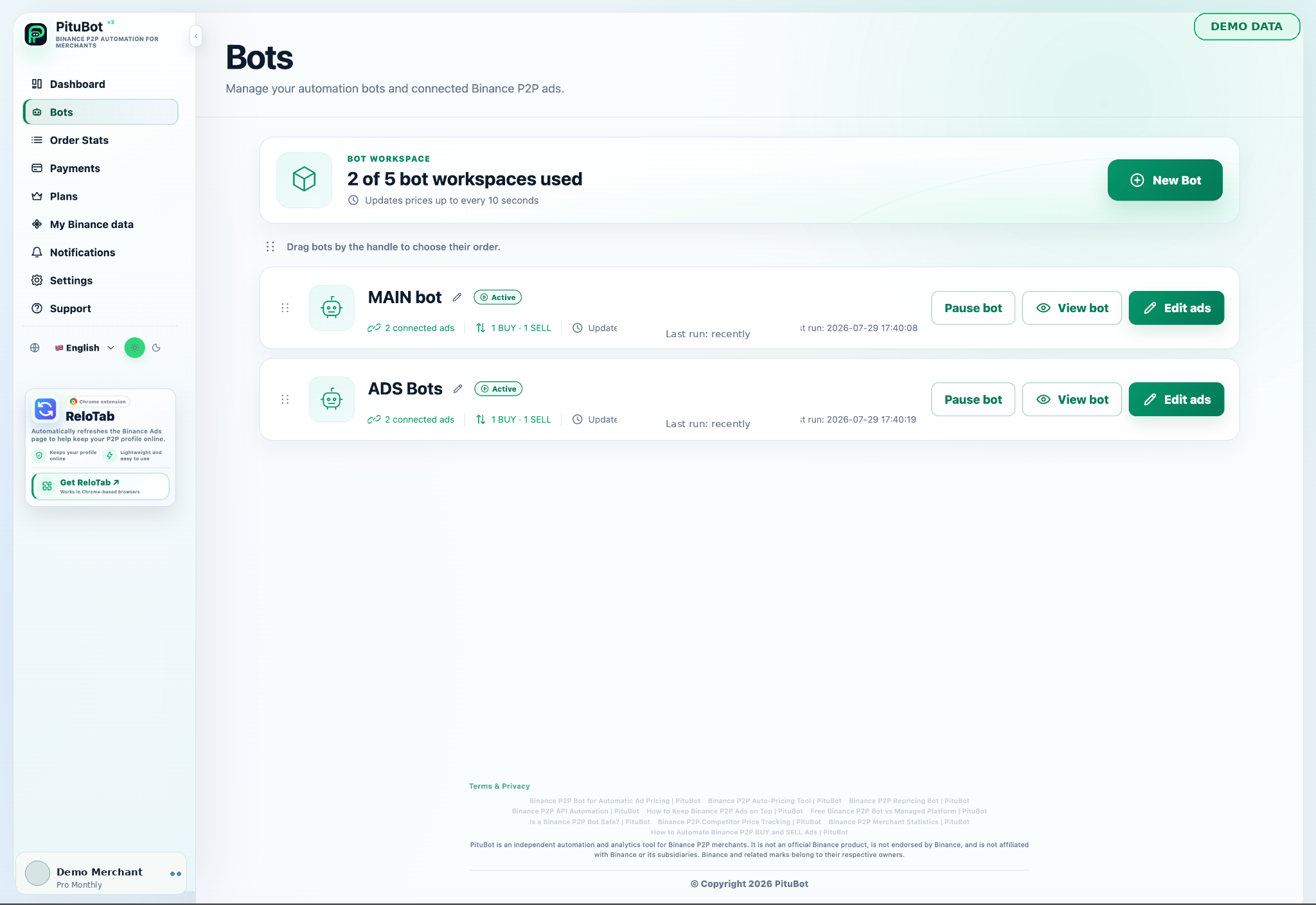
PituBot предоставляет продавцам, имеющим право на участие в программе Binance P2P, единое рабочее пространство для выбора рекламы, настройки отдельных правил BUY и SELL, мониторинга условий конкурентов и анализа действий по автоматизации.
Что включает в себя Binance P2P Управление рекламой
Выберите объявления, которыми вы хотите управлять, установите соответствующие способы оплаты и границы, а затем просмотрите настроенный статус автоматизации, прежде чем активировать изменение.
Управление рекламой объединяет выбранные объявления, их сторону, границы цен, лимиты транзакций, способы оплаты и текущее состояние автоматизации в один проверяемый рабочий процесс. Продавец решает, какие объявления подключить, а остальные объявления может оставить без изменений.
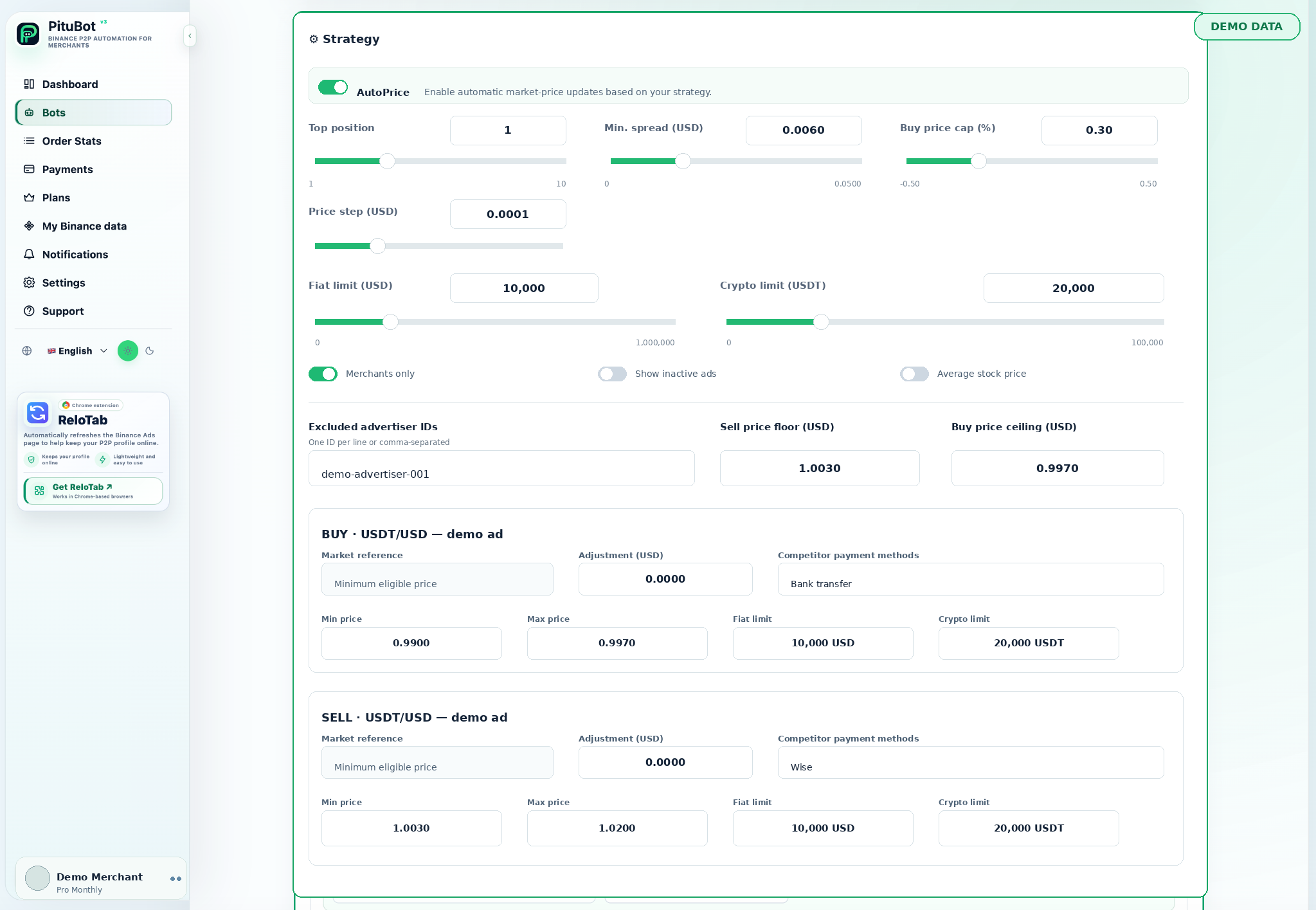
Объявления BUY и SELL преследуют разные цели и могут требовать разных ценовых правил. Отдельные элементы управления позволяют выбрать подходящую сторону сравнения, границы и поведение обновления для каждого выбранного объявления.
Управляйте объявлениями BUY и SELL отдельно
- Используйте только выбранные объявления и соответствующие способы оплаты.
- Установите границы, прежде чем включать автоматизацию
- Просматривайте действия и сохраняйте доступность ручного управления
Выберите соответствующие способы оплаты
Выбор способа оплаты помогает сохранять значимость сравнения. Правило может быть сосредоточено на предложениях, в которых используются способы оплаты, соответствующие выбранному объявлению, вместо того, чтобы рассматривать все объявления на рынке как идентичные.
Установите цену и границы транзакций
Прежде чем включать автоматическое обновление, определите диапазон цен и лимиты транзакций, соответствующие объявлению. Границы — это ограждения настроенного рабочего процесса; они не заменяют мнение продавца или проверку счета.
Просмотр статуса объявления и активности ботов
В рабочей области проще проверить, выбрано ли объявление, приостановлена или активна автоматизация и какие условия оцениваются. Просмотр этого состояния после изменения правила помогает предотвратить непреднамеренное использование старых настроек.
Когда реклама должна оставаться неизменной
Объявление должно оставаться неизменным, если доступное сравнение неактуально, предлагаемое значение выходит за границы, объявление недоступно или продавец хочет приостановить показ. Ручная проверка уместна, когда рыночный сигнал не соответствует стратегии.
PituBot элементы управления для проверки
Четкое управление
Прежде чем включать автоматизацию, просмотрите настройки, применимые к каждому выбранному рабочему процессу.
Соответствующий контекст
Используйте выбранную пару, сторону, способы оплаты и диапазон дат при интерпретации данных.
Ручная проверка
Приостанавливайте или корректируйте конфигурацию всякий раз, когда наблюдаемые условия не соответствуют стратегии.
Практический рабочий процесс
Подключиться
Подключите подходящую учетную запись с необходимыми ограниченными разрешениями.
Выбрать
Выберите рекламу, представление данных или канал уведомлений, соответствующие рабочему процессу.
Настроить
Прежде чем использовать эту функцию, установите фильтры, границы и предпочтения.
Обзор
Просмотрите результат и сохраните ручное управление при изменении условий.
Практический процесс проверки
Начните с данных или выбранных объявлений, которые имеют отношение к принятию решения. Проверьте настроенные условия, сравните доступную информацию и выполняйте проверку вручную всякий раз, когда результат требует оценки.
Часто задаваемые вопросы
Могу ли я управлять только выбранными объявлениями?
Да. Рабочий процесс построен вокруг рекламы, которую продавец выбирает для подключения и настройки.
Могут ли правила BUY и SELL отличаться?
Да. Каждая сторона может использовать свои собственные границы, выбор способа оплаты и условия конкурентов.
Влияют ли способы оплаты на сравнение?
Они могут. Ограничение сравнения релевантными методами может сделать наблюдаемые предложения более полезными для выбранного объявления.
Могу ли я приостановить рабочий процесс с рекламой?
Да. Просмотрите состояние автоматизации и приостановите его перед изменением правил или в случаях, когда предпочтительнее ручное управление.
Гарантирует ли автоматизация позицию объявления?
Нет. Позиция зависит от факторов рынка и платформы, и автоматизация не гарантирует размещение.
Какие биржи можно подключить к PituBot?
Подключайте Binance, OKX, Bybit и Bitget к PituBot. Используйте бесплатный P2P-сканер и доступные инструменты бирж в одном рабочем пространстве. Доступные функции зависят от биржи и разрешений вашего аккаунта.
Начните бесплатную пробную версию PituBot
Подключите соответствующую учетную запись, выберите объявления, которыми хотите управлять, и просмотрите конфигурацию, прежде чем активировать автоматизацию.