
PituBot · Binance P2P
Automatisation API Binance P2P
L’automatisation API relie votre activité marchand à un logiciel pour surveiller et mettre à jour des tâches P2P.
How PituBot connects through API access
Utilisez des clés aux permissions minimales, n’activez pas les retraits et vérifiez régulièrement vos réglages.
API access safeguards
- API avec permissions minimales
- Validation du compte
- Contrôle dans votre compte
What API automation changes and what it does not
API access allows PituBot to read the information and request the supported actions needed for selected P2P workflows. It does not transfer ownership of the merchant account, and it does not remove the merchant's responsibility to review API permissions, connected ads, and strategy limits.
Before starting, confirm that the account is eligible for the intended exchange features. Requirements are set by Binance and can change. PituBot should be treated as an independent tool, not as a Binance product or a guarantee of access.
- Your merchant account remains your account
- Your API permission choices remain your responsibility
- Exchange eligibility is separate from PituBot configuration
Use the minimum permissions required
Create a dedicated API key for PituBot instead of reusing a broad key shared with other software. Enable only the permissions needed for the supported connection. Do not enable withdrawals. Keep account-level protections such as two-factor authentication active in Binance.
Do not assume implementation details that you cannot verify. TODO_SECURITY_STORAGE_REVIEW: confirm the current credential storage and encryption design with the deployed PituBot implementation before making claims about encryption, retention, IP restrictions, or provider access.
- Dedicated key
- Least privilege
- Withdrawal disabled
- Revoke or rotate if exposure is suspected
Connect, validate, and configure in order
Paste the API credentials into the intended PituBot connection flow and validate the merchant account before attaching any ads. If validation fails, correct the key or account configuration before proceeding; do not work around a failed validation by broadening permissions unnecessarily.
Once connected, select the ads, set strategy limits, and review the estimate while the bot is paused. Enable automation only after you can explain what each rule does. This order keeps connection problems separate from pricing decisions.
- Connect
- Validate
- Select ads
- Set boundaries
- Review
- Enable
Illustrative first connection
Illustrative setup: a merchant creates a key that has no withdrawal permission, adds it to PituBot, and validates a single merchant account. They connect one BUY ad, set a narrow maximum price and relevant payment methods, then inspect the resulting estimate before activating the bot.
If the test does not behave as expected, the merchant pauses the bot and edits the strategy. If the key is no longer required, they remove the connection in PituBot and revoke or delete the key in Binance.
Stopping and revoking access
Pausing a bot stops automatic price updates for that bot. Removing a connection or revoking the dedicated key in Binance is the stronger action when access should end entirely. Keep a record of which key belongs to which integration so revocation is quick and unambiguous.
An API error should be treated as a reason to inspect the configuration, not as a reason to grant more permissions by default. Check the key, account status, selected ads, and PituBot error information before changing access.
Hosted workflow versus a custom script
A custom API script can give a technical team maximum control, but that team must host it, schedule it, handle API changes, inspect failures, and maintain its security process. PituBot offers a no-code application flow for supported merchant accounts: connect, validate, select ads, configure rules, and review activity in the product interface.
API access is not universal. It depends on Binance merchant eligibility, the account state, and the permissions available to the key. If validation fails or the account is no longer appropriate for the workflow, do not attempt to work around the result. Review the exchange account and disconnect the integration when it is no longer needed.
- Custom scripts require code, hosting, monitoring, and maintenance ownership
- A hosted workflow does not remove the merchant’s responsibility for account permissions
- Disconnecting the account and revoking a key end access through separate controls
Contrôles PituBot à vérifier
Connection validation
Confirm the connected merchant account before attaching ads.
Selected ad control
Choose only the ads that belong in the bot workspace.
Pause and disconnect
Stop automation before changing rules or ending access.
Security review
Keep API permissions minimal and withdrawals disabled.
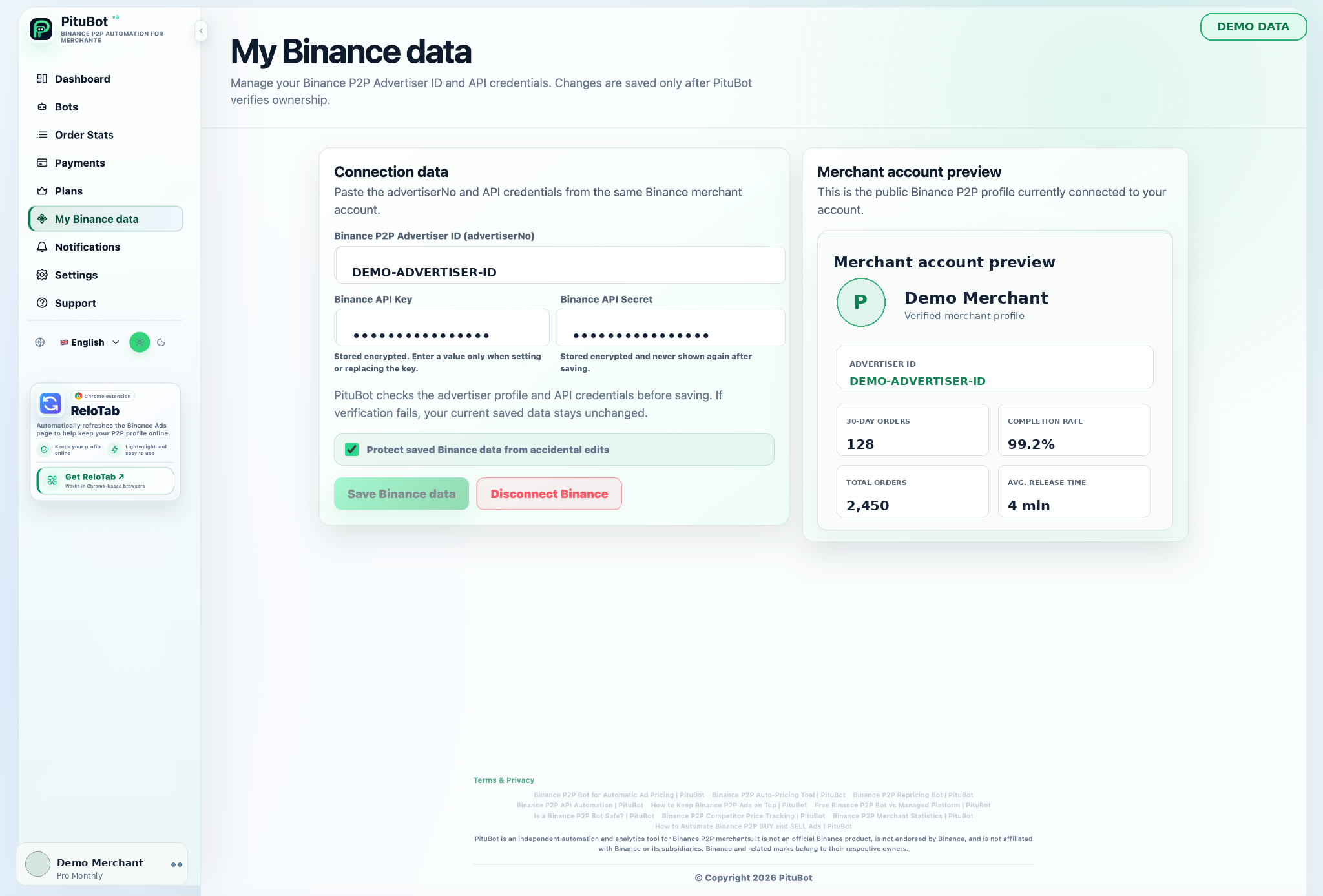
Flux de travail pratique
Create a key
Use a unique key for PituBot and disable withdrawals.
Connect securely
Use the PituBot connection form rather than sharing the secret in chat or email.
Validate
Confirm the correct merchant account is detected.
Configure
Attach ads and set strategy rules while paused.
Review or revoke
Monitor the connection and revoke the key if it is not needed.
Minimum-permission API example
A merchant has one key reserved for PituBot and another for unrelated accounting software. The PituBot key has only the access needed for the selected workflow and never has withdrawal permission. If the merchant stops using PituBot, they can revoke one clearly identified key without disrupting another service.
This separation also makes auditing easier: a failed connection points to the correct key and can be investigated without exposing a broad account credential.
Questions fréquentes
Does PituBot need withdrawal permission?
No. Do not enable withdrawal permission for this workflow.
Should I reuse my main Binance API key?
Use a dedicated key for PituBot so it can be scoped, audited, rotated, or revoked independently.
What should I do if validation fails?
Review the API key, account eligibility, and configured permissions. Do not grant broader permissions without understanding why they would be required.
Can I configure ads before enabling automation?
Yes. Configure selected ads and review the estimate while the bot is paused.
How do I stop API automation?
Pause the relevant bot for immediate operational control. Remove the connection and revoke the dedicated Binance key when access should end.
Does an API connection guarantee Binance P2P access?
No. Binance controls account eligibility and exchange functionality.
Commencer votre essai gratuit PituBot
Utilisez des clés aux permissions minimales, n’activez pas les retraits et vérifiez régulièrement vos réglages.