
PituBot · Binance · OKX · Bybit · Bitget
Binance P2P اطلب التحليلات والإحصائيات
PituBot يساعد المعلنين والتجار المؤهلين على مراجعة Binance P2P سجل الطلبات والحجم ومتوسط الأسعار وطرق الدفع والنطاقات الزمنية والنتائج المقدرة.
ما يتضمنه P2P تحليلات الطلب
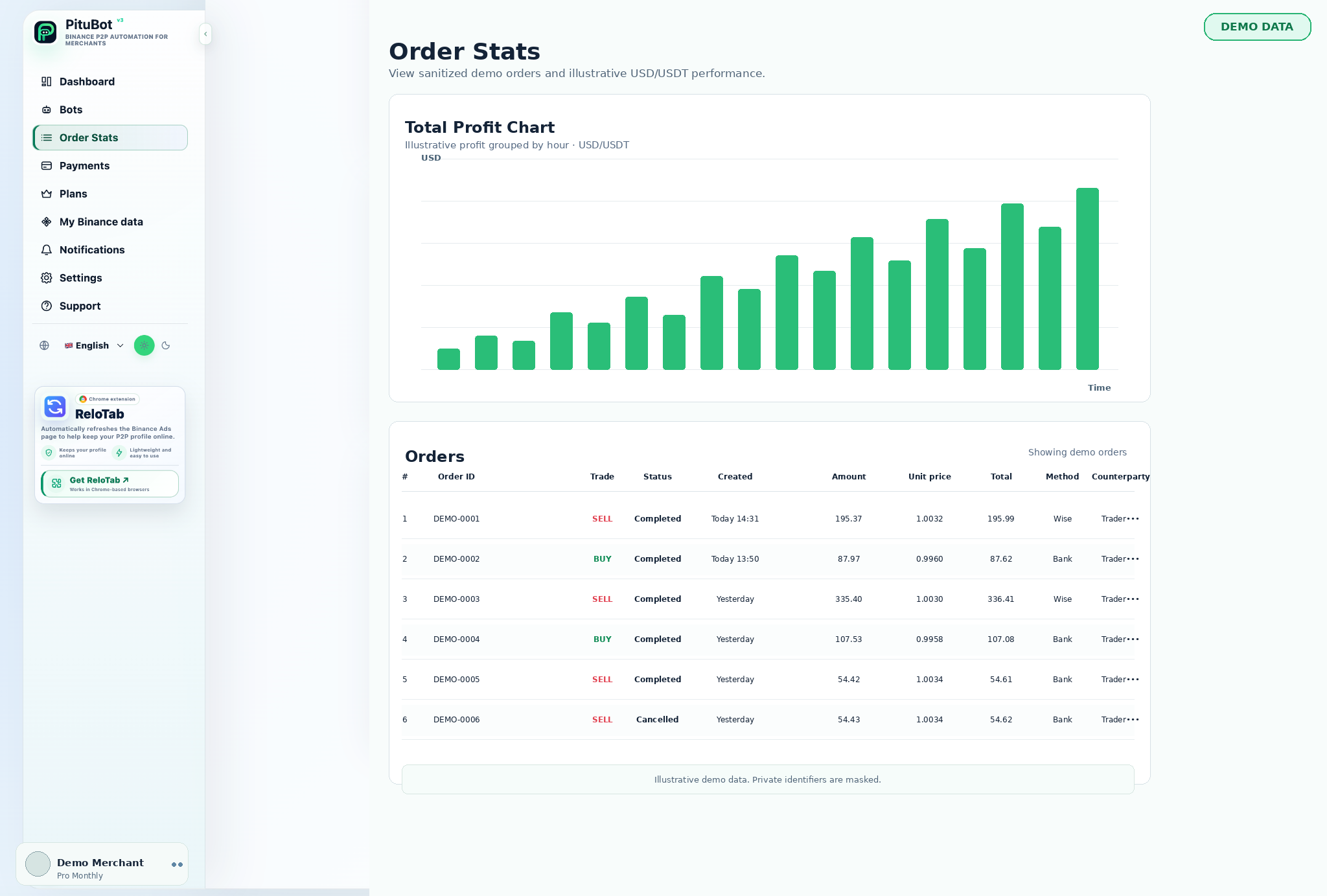
استخدم لوحة معلومات الطلب لمقارنة نشاط BUY وSELL المكتمل، وفحص مزيج طرق الدفع، ومراجعة الاتجاهات لفترة محددة.
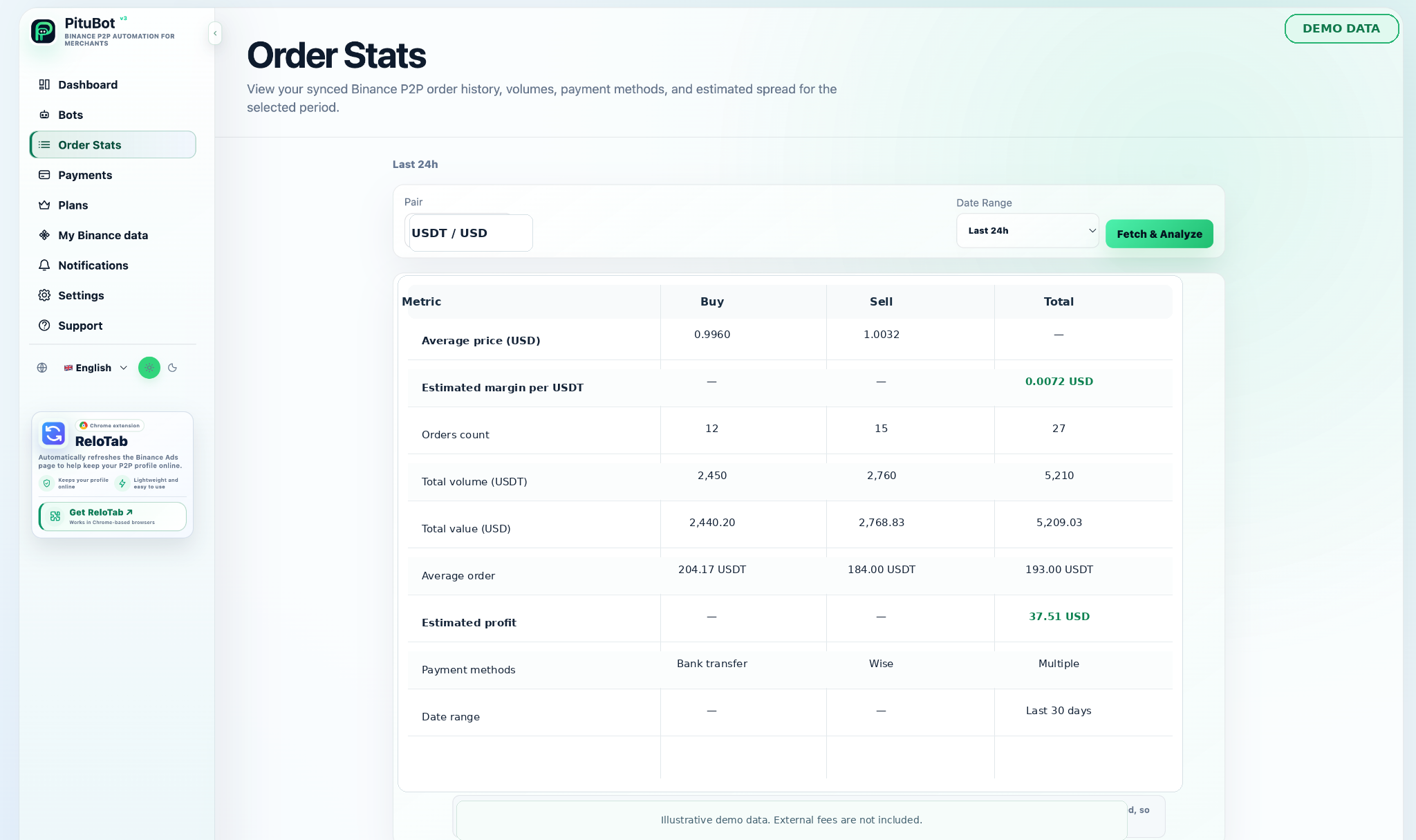
قامت مجموعات تحليلات الطلبات بمزامنة سجل الطلبات في لوحة معلومات قابلة للمراجعة. يمكن أن يساعد التاجر في فحص الفترة المحددة والجانب والأصل والحجم وطريقة الدفع والوحدة المسجلة والقيم الإجمالية.
يؤدي الفصل بين أوامر BUY وSELL إلى تسهيل مقارنة نشاط الاستحواذ والبيع دون الجمع بين استراتيجيات مختلفة في رقم واحد.
BUY و SELL مقارنة الطلب
- استخدم فقط الإعلانات المحددة وطرق الدفع ذات الصلة
- قم بتعيين الحدود قبل تمكين الأتمتة
- قم بمراجعة النشاط واحتفظ بالتحكم اليدوي متاحًا
الحجم في العملات المشفرة والعملات الورقية
يمكن أن يُظهر عرض الحجم مبلغ الأصل إلى جانب إجمالي الأوراق النقدية المقابلة المسجلة للطلب. هذه القيم مفيدة للمراجعة والتسوية ومناقشة الإستراتيجية.
متوسط السعر وحجم الطلب
يمكن لمتوسط الأسعار وأنماط حجم الطلب أن يسلط الضوء على التباين خلال الفترة المختارة. قارنها بالتواريخ وطرق الدفع قبل استخلاص استنتاجات حول الإستراتيجية.
انهيار طريقة الدفع
توضح تفاصيل طرق الدفع كيفية توزيع الطلبات المسجلة عبر الطرق المستخدمة. يمكنهم المساعدة في تحديد الأساليب التي تستحق مراقبة أو قواعد منفصلة.
النطاق الزمني وتحليل الاتجاه
تتيح عناصر التحكم في التاريخ للتاجر مراجعة اليوم الحالي أو الفترة الأخيرة أو نطاق آخر مختار. تلخص مخططات الاتجاه السجلات التي تمت مزامنتها بالفعل مع مساحة العمل؛ ولا يضمنون الظروف المستقبلية.
النتائج المقدرة والرسوم الخارجية
النتائج المقدرة هي مساعدة التخطيط فقط. وقد تستبعد التكاليف المصرفية الخارجية، والتحويل، وطريقة الدفع، والضرائب، وغيرها من التكاليف، لذلك يجب على التجار حساب هذه التكاليف بشكل مستقل.
ضوابط PituBot المطلوب مراجعتها
ضوابط واضحة
قم بمراجعة الإعدادات التي تنطبق على كل سير عمل محدد قبل تمكين الأتمتة.
السياق ذو الصلة
استخدم الزوج والجانب وطرق الدفع ونطاق التاريخ المحدد عند تفسير البيانات.
مراجعة يدوية
قم بإيقاف التكوين مؤقتًا أو ضبطه عندما لا تتناسب الظروف المرصودة مع الإستراتيجية.
سير عمل عملي
الاتصال
قم بتوصيل حساب مؤهل بالأذونات المحدودة المطلوبة.
اختر
حدد الإعلانات أو طريقة عرض البيانات أو قناة الإشعارات ذات الصلة بسير العمل.
تكوين
قم بتعيين عوامل التصفية والحدود والتفضيلات قبل استخدام الميزة.
مراجعة
راجع النتيجة واحتفظ بالتحكم اليدوي عند تغير الظروف.
عملية مراجعة عملية
ابدأ بالبيانات أو الإعلانات المحددة ذات الصلة بالقرار. تحقق من الشروط التي تم تكوينها، وقارن المعلومات المتاحة، واحتفظ بخطوة المراجعة اليدوية عندما تحتاج النتيجة إلى الحكم.
الأسئلة المتداولة
هل يتم فصل أوامر BUY وSELL؟
نعم. يمكن للوحة القيادة تقديم الجانبين بشكل منفصل لمراجعة أكثر وضوحًا.
هل يمكنني تصفية تحليلات الطلب حسب التاريخ؟
نعم. استخدم عناصر التحكم في النطاق الزمني المتاحة لمراجعة الفترة ذات الصلة.
هل تشمل النتائج المقدرة كل التكاليف؟
لا، قد يتم استبعاد التكاليف المصرفية الخارجية والتحويل وطريقة الدفع والضرائب والتكاليف الأخرى.
هل يمكنني مراجعة استخدام طريقة الدفع؟
نعم. يمكن لعرض الطلب تجميع أو تحديد طرق الدفع المسجلة.
هل تتنبأ البيانات التاريخية بالنتائج المستقبلية؟
لا، التحليلات التاريخية ليست توقعات.
ما المنصات التي يمكنني ربطها بـPituBot؟
اربط Binance وOKX وBybit وBitget بـPituBot. استكشف ماسح P2P المجاني وأدر أدوات المنصات المدعومة في مساحة عمل واحدة. تعتمد الميزات المتاحة على المنصة وصلاحيات حسابك.
ابدأ تجربتك المجانية PituBot
قم بتوصيل حساب مؤهل ومراجعة بيانات الطلب المتاحة لمساحة العمل الخاصة بك.