
PituBot · Binance · OKX · Bybit · Bitget
Binance P2P Auto-Pricing Tool
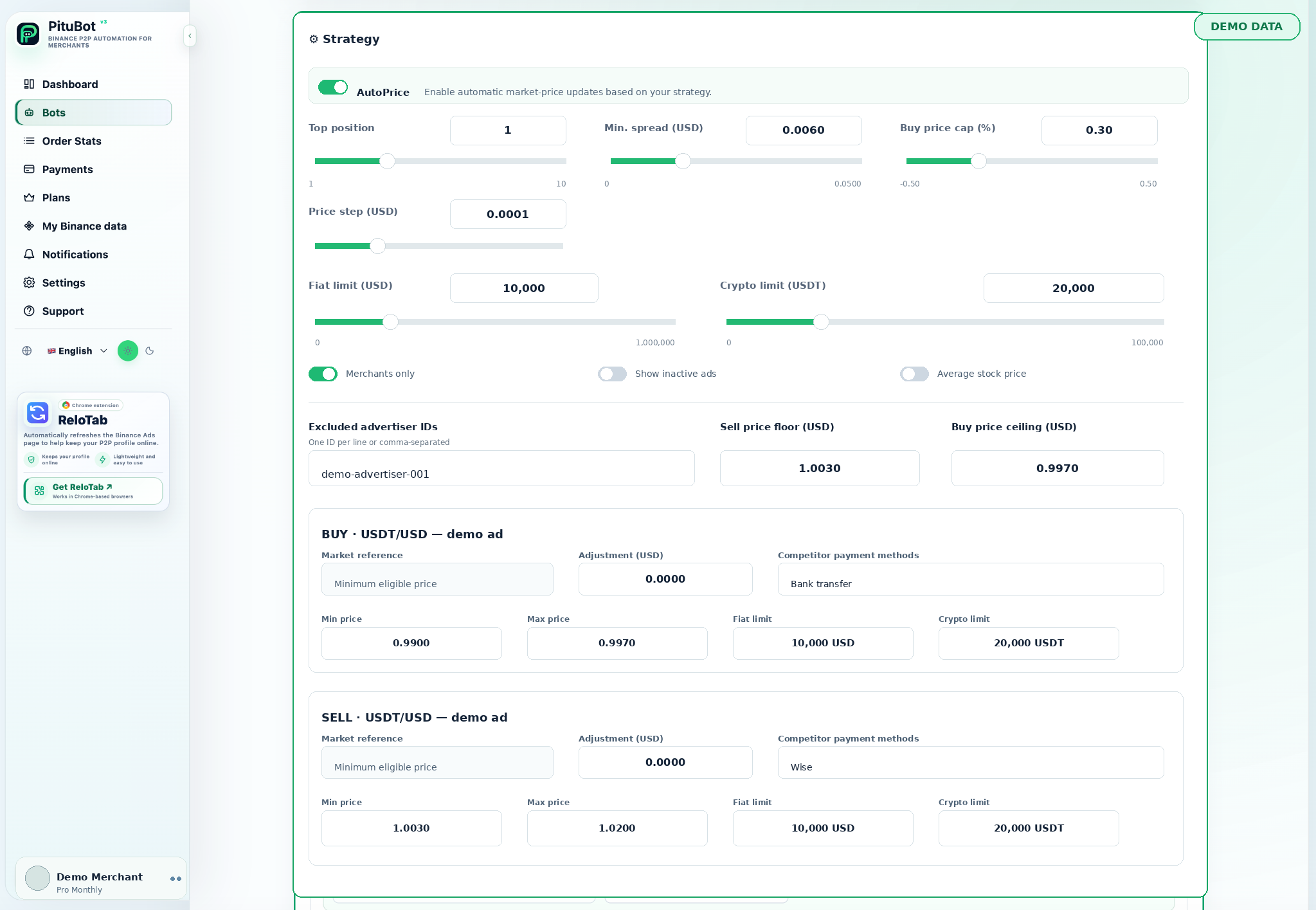
PituBot auto-pricing is a configuration tool for merchants who want selected Binance P2P ads to react to relevant market data without giving up their own limits. The merchant defines the market to compare and the range in which an update may occur.
What auto-pricing controls
Use minimum and maximum prices, payment-method filters, merchant-only comparison, and a configured refresh interval. Review your rules before enabling any automatic update.
Auto-pricing rules to review
- Set a floor or ceiling before enabling an update
- Match only competitor payment methods that are relevant to the ad
- Review a current estimate before saving a strategy
Auto-pricing starts with configuration, not a price race
An auto-pricing rule begins with an ad, its side, pair, selected payment methods, and transaction constraints. PituBot then evaluates suitable market observations and produces a candidate. That candidate is not automatically the final price: the ad's own floor, ceiling, and safety conditions still decide whether it is acceptable.
This distinction matters because a visible low or high price may belong to a different payment method, an unusable order range, or an inactive ad. Matching conditions before pricing helps prevent a strategy from treating every listing as direct competition.
- Price bounds remain merchant-owned
- Comparable offers should match the ad's practical conditions
- A candidate outside a bound should not be applied
Set floors, ceilings, and side-specific rules
For a BUY ad, a maximum price can express the highest acceptable acquisition rate. For a SELL ad, a minimum price can express the lowest acceptable selling rate. Each ad has its own strategy card because using the same target for both sides can ignore their different commercial purpose.
PituBot also shows an estimate as settings change. Treat it as a current scenario based on currently available data. The next eligible market observation can differ, so the estimate should be reviewed with the configured bounds instead of treated as a promise.
- BUY maximums and SELL minimums can differ
- Per-ad payment selection is part of the price rule
- Estimate first, save only after review
Use filters to make the market signal relevant
Payment method is usually the first filter to review. An offer that accepts a bank your ad does not accept may not be directly comparable. Fiat and crypto limits can further distinguish a small transaction from a high-value transaction. Plan-available merchant-only, inactive-ad, and excluded-merchant controls should be used deliberately, not simply switched on.
A narrower market is not always a better one. If filters are too strict, there may be no eligible offer and no price change. That is often safer than creating a price from an unrelated listing.
See how PituBot competitor filters define a relevant comparison set.
Illustrative auto-pricing example
Illustrative BUY example: the BUY boundary is 0.995 USD per USDT, the competitor price is 0.998 USD per USDT, and the maximum BUY price is 0.997 USD per USDT. PituBot evaluates the relevant active BUY offer, but it does not exceed the configured maximum. The figures are illustrative only.
If the only cheaper listing has an incompatible selected payment method or an order range that does not fit, it is excluded from the example. The merchant's configured boundary wins over a market reference that would place the ad outside the permitted range.
- Numbers are illustrative only
- The merchant chooses the bound first
- Relevant filters matter as much as the displayed price
When PituBot should not change a price
No change is appropriate when the bot is paused, no comparable active offer remains after filters, a candidate violates the ad boundary, or the final same-side account check cannot find a valid nearby price. A skipped update can show that the controls are working.
Review the current strategy after changing payment methods, transaction limits, or the business purpose of an ad. Keeping the old configuration while the offer itself changes is a common cause of poor market comparisons.
- Paused bot
- No eligible competitor
- Boundary reached or no safe final placement
Review the final candidate, not only the market reference
The market reference is an input, while the final candidate is the number that must satisfy the complete strategy. A valid reference can still lead to no change when it conflicts with the ad boundary, a selected limit, or final same-account positioning. This prevents an otherwise relevant competitor from overriding a merchant-controlled limit.
When a result is not what you expected, compare the configured maximum or minimum with the displayed estimate, then inspect the selected competitor conditions. That sequence is more reliable than broadening every filter or increasing a boundary simply to force an update.
PituBot controls to review
Price boundaries
Use minimum and maximum prices to limit an eligible update.
Payment matching
Select competitor payment methods per ad.
Market mode
Eligible Platinum settings can use a selected minimum or maximum market reference plus an offset.
Reviewable estimates
Strategy changes calculate the current estimate before confirmation.
Practical workflow
Select an ad
Start with one BUY or SELL ad you can review closely.
Choose comparators
Select only meaningful payment methods and limits.
Set the range
Add a floor, ceiling, or plan-available market rule.
Check the estimate
Compare the displayed candidate against your own objective.
Enable intentionally
Save, confirm, and monitor the first bot runs.
Illustrative floor-and-ceiling test
Illustrative SELL example: the average acquisition price is 0.996 USD per USDT and the minimum required spread is 0.006 USD, producing a minimum SELL price of 1.002 USD per USDT. A relevant competitor is at 1.004 USD per USDT. PituBot may set the ad near 1.003 USD while respecting the minimum SELL boundary.
If a competitor moves below the required floor, the strategy can observe that move but must not follow it below the merchant's configured boundary. The merchant can pause immediately if the business objective changes.
Frequently asked questions
What does a Binance P2P auto-pricing tool do?
It evaluates selected market conditions for an ad and can apply a candidate price only when that candidate complies with the merchant's strategy and boundaries.
Does auto-pricing ignore my minimum or maximum?
No. The configured boundary is checked before an eligible update is requested.
Why did the price remain unchanged?
There may be no comparable offer after filters, the candidate may be outside the permitted range, the bot may be paused, or no safe final account placement may exist.
Should every payment method be selected?
Only select methods that genuinely compete for that ad. Including irrelevant methods can distort the market comparison.
Can I use different auto-pricing rules for BUY and SELL?
Yes. Each attached ad can have separate boundaries, payment methods, and market settings.
Does auto-pricing prevent every price war?
No tool can control the marketplace. Boundaries and relevance filters help avoid uncontrolled reactions, but merchants remain responsible for the strategy they choose.
Which exchanges can I connect to PituBot?
Connect Binance, OKX, Bybit and Bitget to PituBot. Explore the free P2P scanner and manage supported exchange tools in one workspace. Available features depend on the exchange and your account permissions.
Start your free PituBot trial
Create an account, connect only the merchant account and ads you intend to manage, then review the configuration before enabling automation.