
PituBot · Binance · OKX · Bybit · Bitget
Binance P2P Competitor Monitor
Competitor price tracking is useful only when the compared offers can genuinely compete with the ad you manage. PituBot helps narrow the list by pair, side, payment method, order limits, activity, and plan-available merchant filters.
How relevant competitor ads are selected
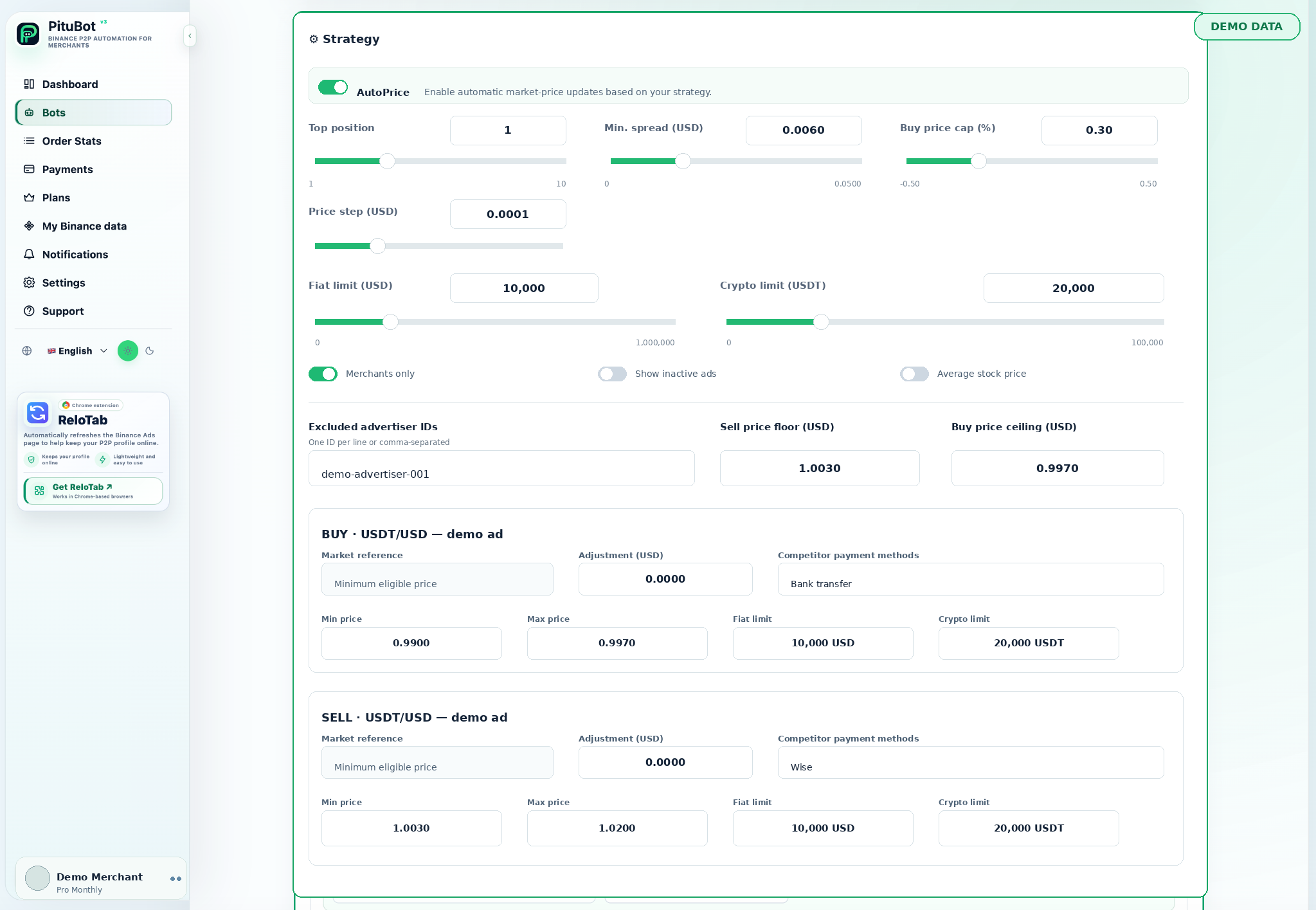
Filter by pair, side, payment method, order limits, merchant status, and active offers. A useful comparison excludes ads that cannot actually compete with your conditions.
Competitor comparison filters
- Keep BUY and SELL comparisons separate
- Choose payment methods that are relevant to the managed ad
- Exclude offers that cannot meet the intended transaction conditions
Track a market that can actually compete
A raw list of P2P prices is not a strategy. An offer should first match the same asset/fiat pair and the same side. Then it should be tested against the payment methods, minimum and maximum transaction conditions, and activity state relevant to the ad.
PituBot makes these choices visible at the ad level. A merchant can decide whether to compare merchant-only offers where the plan supports it, whether inactive ads should be included, and whether named merchants should be excluded from competition.
- Pair and side
- Payment method
- Fiat and crypto transaction range
- Active state and merchant conditions
Filters that include and exclude different offers
Consider two BUY offers for the same pair. One accepts a selected bank and serves the desired range; the other accepts a different bank and ends below the merchant's minimum fiat limit. The first can be included in the comparison. The second may be visible to some users, but it is not necessarily a valid pricing reference for this ad.
The same logic applies to SELL offers. A higher or lower displayed price can be irrelevant if the payment method, side, or transaction range does not match the merchant's own offer.
- Include matching payment methods
- Exclude mismatched limits
- Avoid cross-side comparisons
Use the list as evidence, not an instruction
The competitor list helps explain a candidate price. It should not cause a merchant to copy the first listing. Review the current refresh, the offer's limit range, and the strategy boundary before deciding whether a change makes sense.
If filters become too broad, the comparison can include false signals. If they become too narrow, no eligible competitor may remain. Both outcomes are useful feedback for refining the strategy.
See how auto-pricing uses the selected competitor set alongside price boundaries.
Illustrative filter review
Illustrative case: a USDT/USD BUY ad accepts one selected payment method and starts at 500 USD. An offer at 0.995 USD per USDT accepts only another payment method and has a 100 USD maximum. It is excluded. An active BUY offer at 0.997 USD per USDT overlaps the limit range and remains in the comparison.
The merchant can now evaluate a candidate against 0.997 USD per USDT rather than reacting to the unusable 0.995 USD listing. The numbers are illustrative; the selected filters and boundaries decide what is valid in a real workspace.
Avoid false competitor signals
False signals often come from an inactive ad, a mismatched payment method, a different side, a different transaction range, or a merchant that the strategy intentionally excludes. Review exclusions periodically so a filter created for one market condition does not become permanent without reason.
Tracking is not a guarantee of visibility or price. It is a way to make the underlying comparison inspectable before an automated or manual decision.
A repeatable way to audit a competitor list
Start with the managed ad and write down its pair, side, payment methods, and usable order range. Then inspect one competitor at a time: does it match the side, offer a selected payment method, overlap the range, and remain active? This audit is slower than copying the first price, but it avoids using a listing that cannot serve the same customer.
Repeat the audit when a merchant changes an ad’s bank methods or limits. A configuration that was appropriate for one offer can become misleading after the offer changes. The goal is a smaller, explainable comparison set—not the largest possible list of prices.
When to change a filter
Change a filter because the managed ad has changed, not simply because the current result is inconvenient. Adding a new bank method, changing an order limit, or choosing a different customer segment are valid reasons to revisit the competitor set. A temporary low listing that does not match the ad is not a reason to redefine the market around it.
PituBot controls to review
Side-aware lists
BUY and SELL offers remain separate.
Payment filters
Select relevant competitor payment types per ad.
Limit filters
Use fiat and crypto conditions to reduce irrelevant offers.
Exclusions
Eligible plans can exclude selected merchants from price competition.
Practical workflow
Identify the ad
Choose the pair and side you are managing.
Select payments
Keep only comparable payment methods.
Set limits
Define the intended transaction range.
Review activity
Check whether offers are active and usable.
Use the evidence
Apply your own strategy bounds to the filtered market.
Why the lowest offer may be excluded
A low competitor price can be tempting, but an ad with a different payment method or non-overlapping order range does not represent the same buyer journey. Filtering it out is not ignoring the market; it is defining the market correctly for the ad.
The resulting competitor list can be shorter, but it is more useful for a merchant who wants to avoid reacting to irrelevant offers.
Frequently asked questions
What is Binance P2P competitor price tracking?
It is the process of observing comparable active offers around a selected ad before making a pricing decision.
Should I track every payment method?
No. Select payment methods that are genuinely relevant to the ad you manage.
Why do transaction limits matter?
An offer that cannot serve the intended transaction range may not be a direct competitor.
Can PituBot compare BUY and SELL together?
They should be compared separately because they represent different market sides and strategy objectives.
Can inactive ads affect the comparison?
A strategy can control whether inactive competitor ads are shown where the plan supports it. Inactive offers should be reviewed carefully because they cannot serve a live transaction.
Can I exclude a merchant?
Where your plan and strategy support it, selected merchants can be excluded from price competition.
Which exchanges can I connect to PituBot?
Connect Binance, OKX, Bybit and Bitget to PituBot. Explore the free P2P scanner and manage supported exchange tools in one workspace. Available features depend on the exchange and your account permissions.
Start your free PituBot trial
Create an account, connect only the merchant account and ads you intend to manage, then review the configuration before enabling automation.